

Quickly and easily create a tool management database
With the TMS Tool Management Solutions software from ZOLLER, manufacturing companies can create a comprehensive database for digitized tool management.
|


With the TMS Tool Management Solutions software from ZOLLER, manufacturing companies can create a comprehensive database for digitized tool management.
Some medium-sized manufacturing companies have reservations about digitalizing tool organization and management. But Christoph Zoller, Managing Director of E. Zoller GmbH & Co. KG in Pleidelsheim, says: "With our TMS Tool Management Solutions software, users can transfer data from individual tables, catalogs and the Internet at the touch of a button."
With the right tool management software, companies of all sizes can quickly and conveniently create the basis for digitalizing cutting tool processes.
Benefits of digitized tool management include:
All production areas benefit: purchasing, CAD design, CAD/CAM programming, tool preparation with measuring, setting, assembly and disassembly, the tool store, and the machine setters.
Robin Bender, Project Manager for the TMS Tool Management Solutions software at ZOLLER, explains the creation of master data for digitized tool management: "Our software can be used flexibly according to the respective requirements. For example, master data can be easily and quickly transferred from the frequently used tables in the standard Excel software."
ZOLLER provides a standardized table (a template) for this purpose. The TMS Tool Management Solutions software quickly reads tool data and saves it in the designated data fields. The data from individual tables only needs to be converted to match the standard ZOLLER table, i.e. written to the relevant columns.
"Of course, we support our customers with conversion software. All we need is the formatting of the individual tables. Then the tool data can be transferred to our tool management software at the touch of a button," explains Bender.
Bender describes the import via the ToolsUnited Internet platform from Cimsource in Aachen (www.cimsource.com) as another convenient and fast method of data transfer. It is called up directly under the ZOLLER software.
"There are mainly standard tools from a large number of internationally active tool manufacturers to choose from. You can make individual selections at the click of a mouse and start the data transfer," Bender reports.
An interface is integrated into the ZOLLER software for the direct import of tool data. It can be used to import individual tools using the manufacturer's article numbers. You have the option of selecting by machining process and display comprehensive lists. The selection can be refined using further criteria such as diameters, lengths, and number of cutting edges. The selected tools are imported into the TMS Tool Management Solutions software at the touch of a button. All you need to do is enter an individual ID number.
Users have the option of automating the import of complete tool lists. This enables a comprehensive selection of standard tools to be entered into the tool management software with minimal effort and in the shortest possible time. A particular advantage is that tool parameters standardized by the manufacturers and, if desired, 3D graphics for current CAD/CAM programming and simulation systems are included. When investing in the ZOLLER software, only a (temporary) license for the ToolsUnited Internet platform is required.
If manufacturing companies mainly work with tools from just one or a few manufacturers, it is also worthwhile automatically transferring data directly from their digital catalogs on the Internet. However, data transfer depends on the options provided by the respective manufacturers. Bender explains: "Some tool manufacturers only provide entire catalogs as a data set, while others also offer selection criteria, for example according to material characteristics. With the latter, you can transfer individually predefined lists of tools."
This is possible because the master data of the tools is largely stored and labeled in a standardized way.
Bender adds: "Of course, specialists can continue to edit the automatically entered tool data individually in the ZOLLER software. They can use the editing function to assign their own master data numbers or add additional fields for selecting lists."
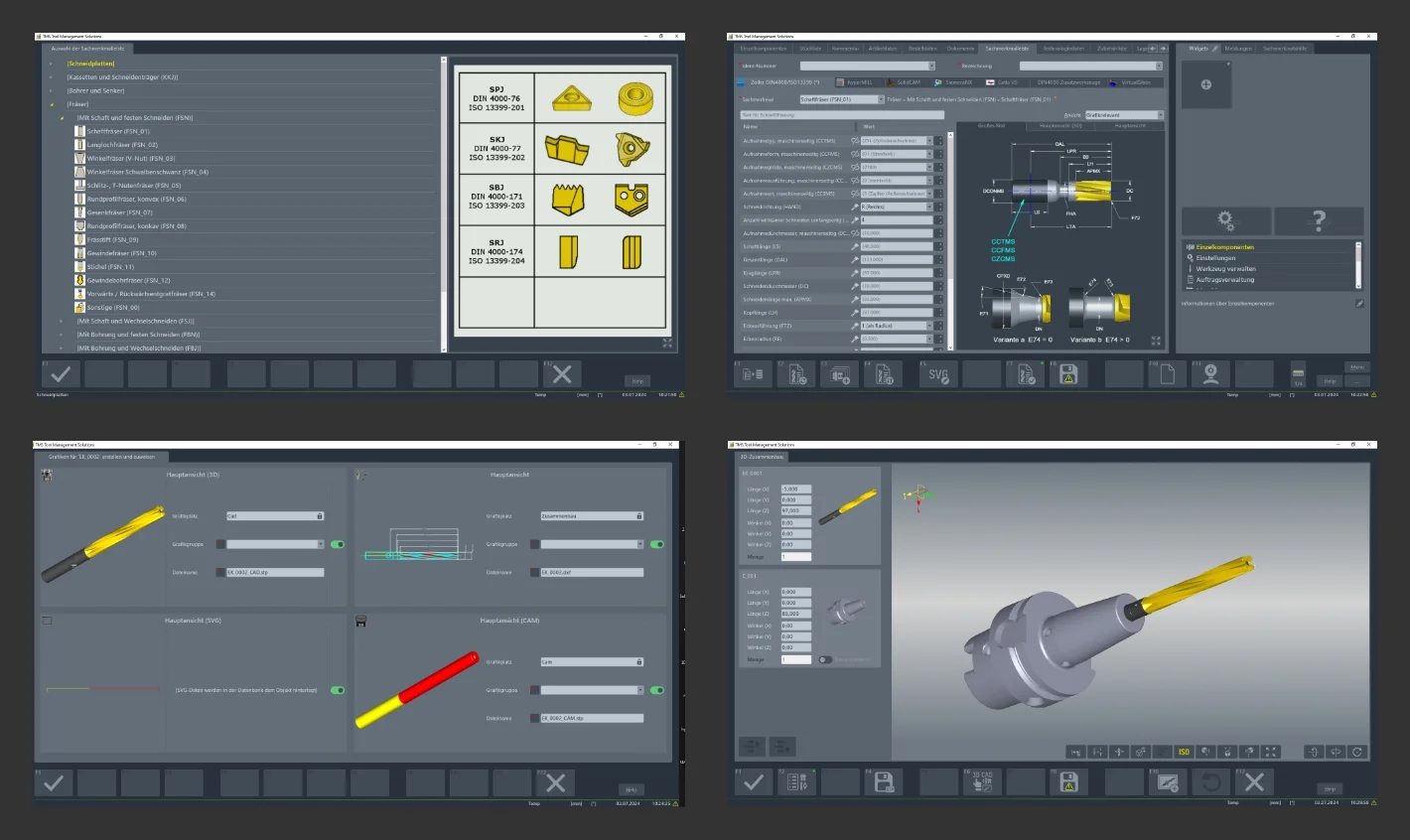
If manufacturing companies work with individual tools, these can be defined and saved in the TMS Tool Management Solutions software using input fields with a variety of parameters and criteria. "First, the staff select a machining process for the tool to be created, for example milling. A master data sheet for milling tools then appears on the screen. This contains the geometries and parameters to be defined for this tool category," Bender reports.
An ID number must be assigned at the beginning, followed by the data describing the respective tool. "The advantage of our tool management software is that data that does not necessarily have to be individually defined is already specified with default values. A few parameters are therefore usually sufficient to define a tool sufficiently for use in tool management," says Bender.
These include some basic dimensions. Further details, such as clearance angles on cutting edges and similar geometries, can be specified precisely at a later stage, insofar as this is required for use in CAD/CAM systems, in presetting and on CNC machines.
This individual data input is available in the TMS Tool Management Solutions software either for monoblock tools (like solid carbide milling cutters) or for assembled complete tools. For the latter, automatic plausibility checks in accordance with DIN 4000 ensure that only sensible and technically feasible complete tools are specified and saved. This ensures maximum process reliability.
If the tool management software already contains components, complete tools can be created partially automatically. To do this, staff simply select the desired components, like tool holder, collet chuck, and solid carbide drill. After checking for suitable geometries, the ZOLLER software automatically assembles the complete tool. A master number is specified for saving and a separate data record is created. The tool management software automatically creates a 3D model (solid model) for CAD/CAM programming and simulation.
When installing the TMS Tool Management Solutions software and selecting and creating master data, the specialists from ZOLLER naturally provide support for specialists in manufacturing companies.
"We want to pave the way for smaller companies in particular to achieve comprehensive digitalization with all its benefits. To this end, we provide our extensive expertise and experience from industrial practice. Users can fully rely on the know-how of our qualified experts. We provide detailed advice on the best way to enter data into our software. We have also designed the operation of the software to be largely intuitive. This means that even personnel with little experience of using software can use our tool management software successfully and profitably within a very short time after minimal training," emphasizes Christoph Zoller.
Learn more about ZOLLER tool management software.

Europe
 Back to overview